You are on the list. We will write when the Unity beta opens.
For Unity game developers
Your game looks great. Your UI looks like a placeholder.
Packs never match. Artists take weeks. AI art comes out different every time, with messy edges and nothing game ready. Players notice before they ever press Play.
Free early access · Made for Unity · Not an AI image generator
THE PAIN
You know this feeling.
UI is the first thing players touch and the last thing anyone has time for.
- You find a UI pack you love. Then you need a shop screen it doesn’t have.
- You mix in a second pack. Now the corners, shadows and fonts don’t agree.
- You ask an artist and wait. Then you need one more button.
THE REAL COST
And it only gets worse.
Every new screen means more art.
Shop, settings, inventory, pause. Each one waits on someone to draw it.
Change the art direction, start over.
A new look means redrawing every button, panel and icon by hand.
Every screen size needs its own care.
Phones, tablets and desktop all need pieces that stretch cleanly and stay sharp.
Screenshots sell your game.
Mismatched UI makes a good game look unfinished on its store page and in every pitch.
Tried AI art? It brings new problems.
- Nothing matches. Every generation comes out a little different, so your buttons, panels and icons never look like one set.
- Messy edges. Halos, leftover backgrounds and missing pixels mean cleanup on every image.
- Not game ready. Wrong sizes, text baked into the art, nothing that stretches cleanly. You still fix it all by hand.
- Credits and disclosure. Most charge per image and run online, and on Steam, AI art that players see has to be disclosed.
THE FIX
Meet Restyle. Pick a style. Your whole UI follows.
Restyle is a Unity Editor tool that redraws your whole game UI to match one art style. Lay out your screens once. Choose an art style, and Restyle redraws every panel, button, bar and icon to match, right inside Unity.
Restyle isn’t an AI image generator. Every piece matches, every time, and stays editable.
And soon, you’ll be able to describe a style in your own words. See what’s next.
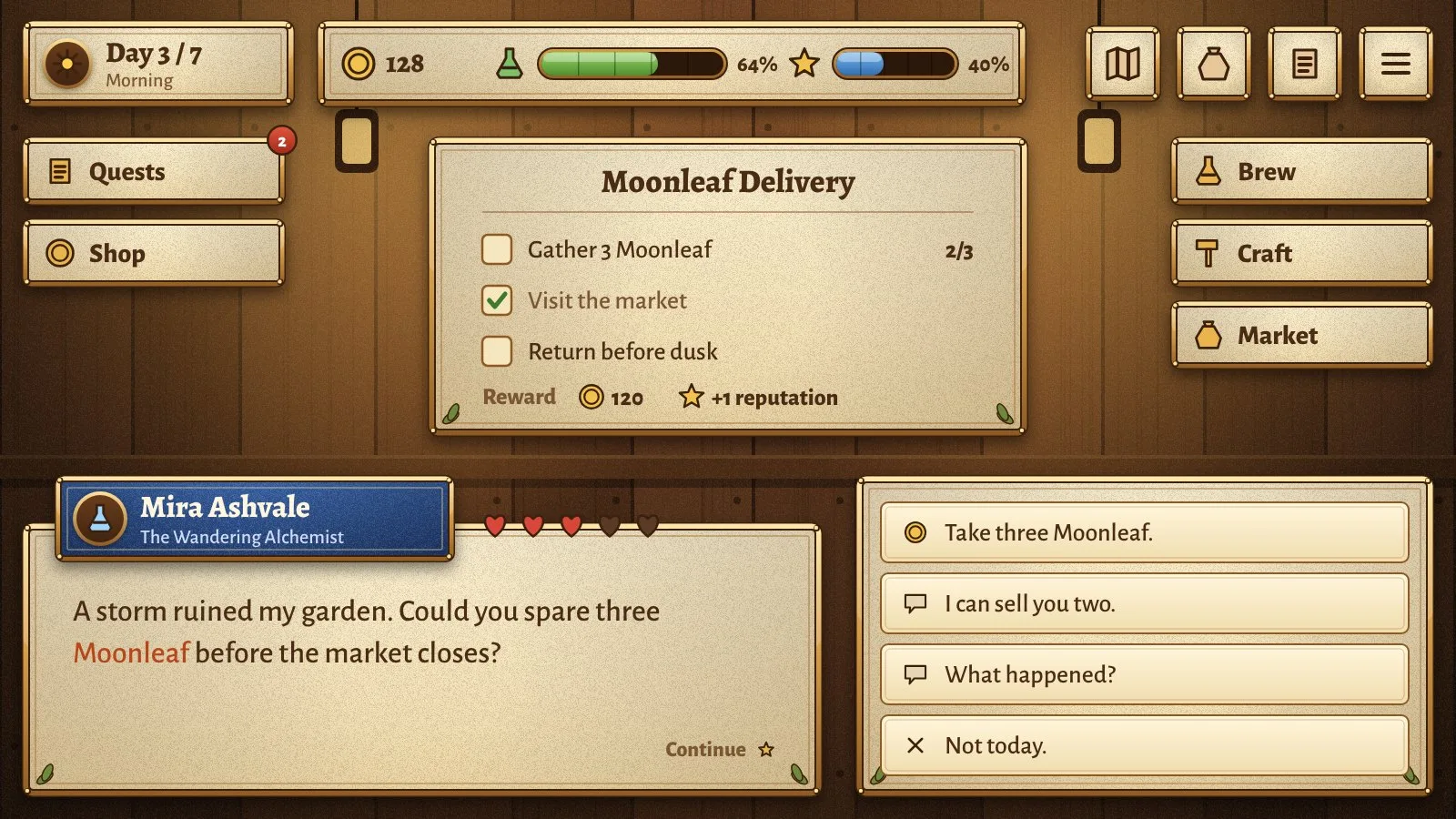
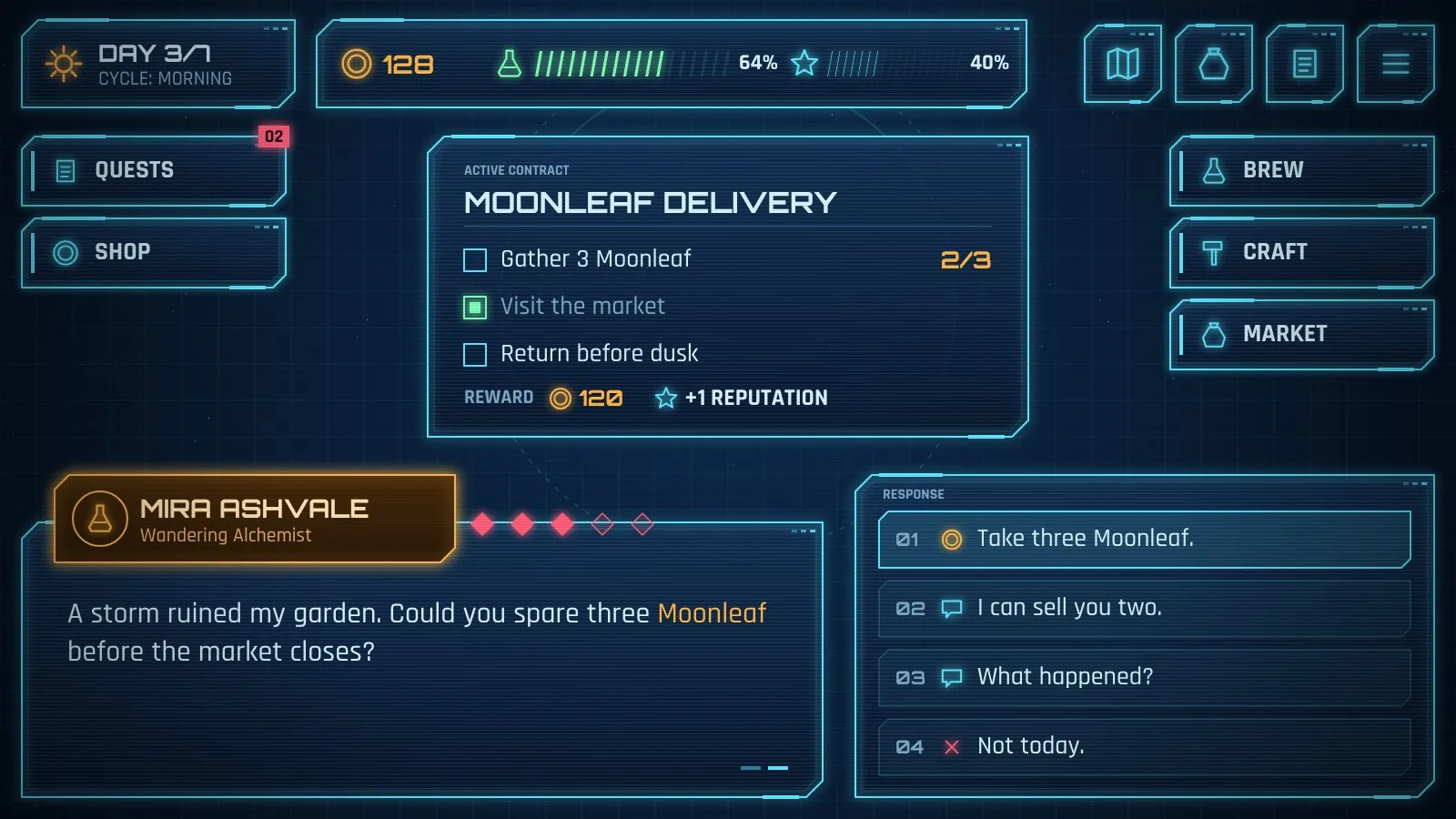
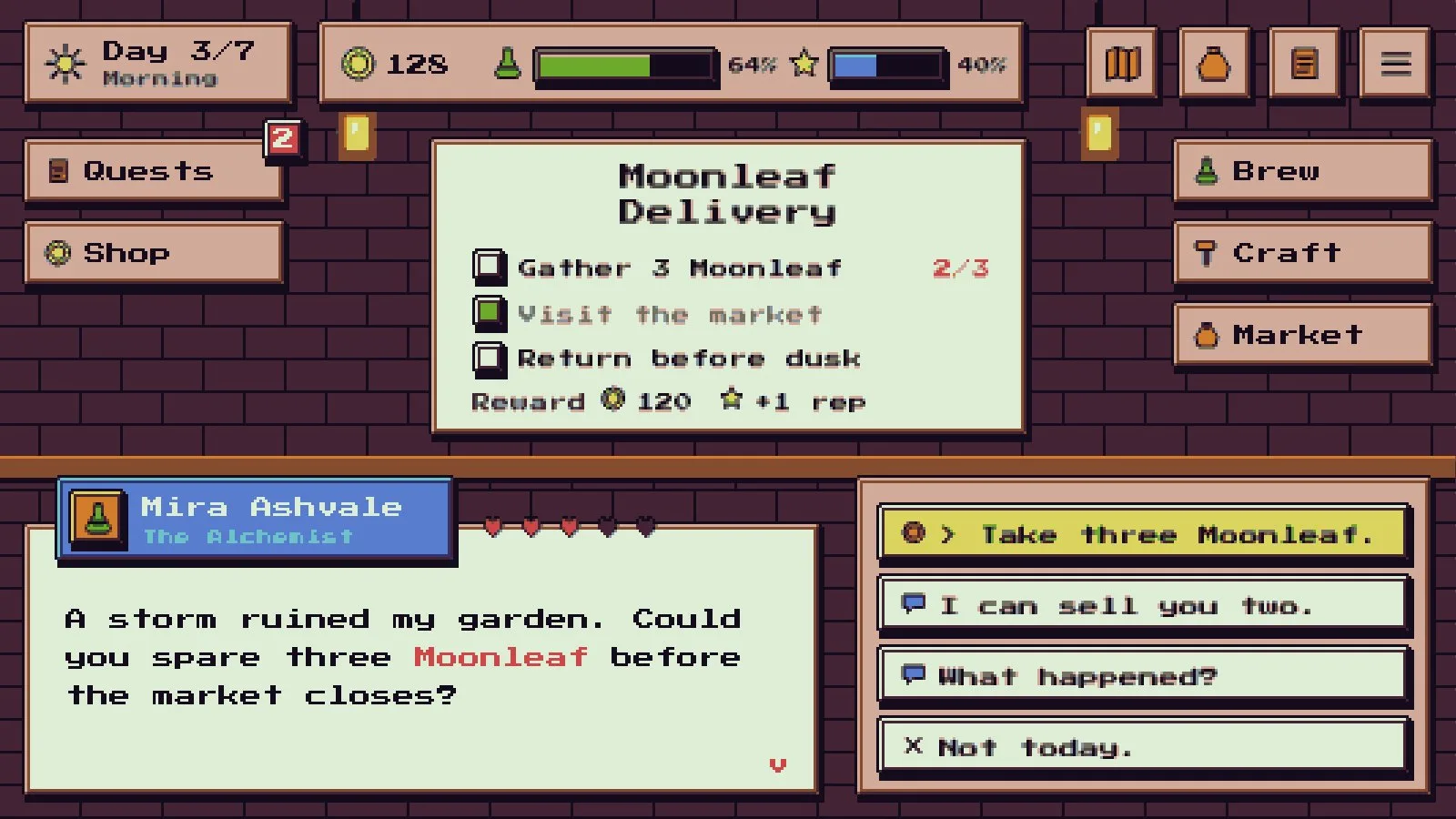
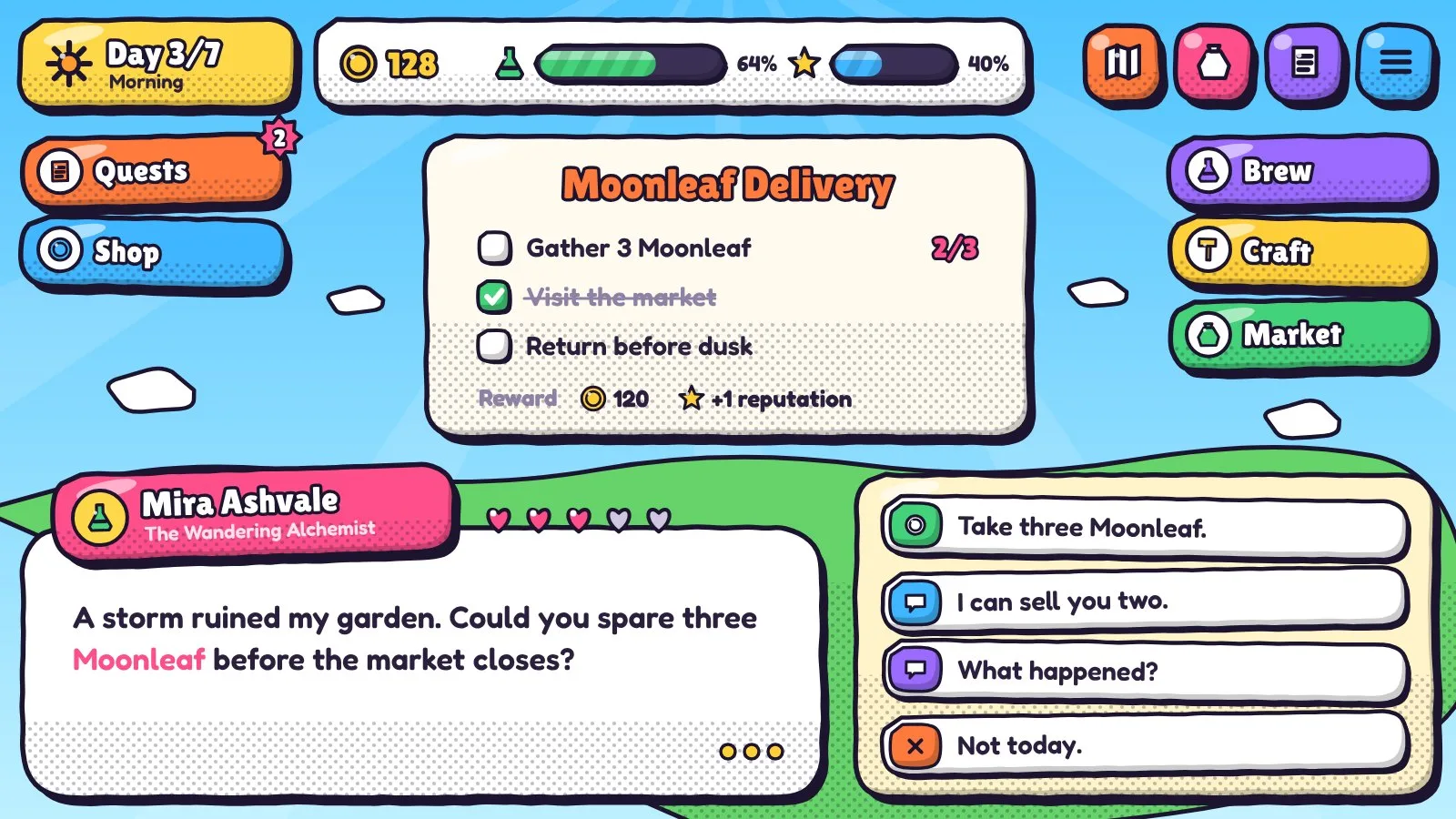
TRY IT
Same screen. Four styles. Click to switch.
HOW IT WORKS
Three steps. One layout.
Lay out your screen once.
Panels, buttons, bars, dialogue and icons, placed where you want them.
Pick an art style.
Tavern, Space HUD, Pixel art or Cartoon. Every piece redraws to match.
Export sprites for Unity.
Transparent sprites, ready to drop into your scenes.
WHAT CHANGES FOR YOU
Spend your time on the game, not the UI.
- Look finished from day one.Ship screens that look designed, even before you hire an artist.
- Change direction in a click.Try a new art style without redrawing anything.
- Stay consistent as you grow.Every new screen matches the ones you already have.
- Pitch with confidence.Show publishers and players screens that look real.
- Keep your work private.It all runs on your machine. Nothing is uploaded.
WHY RESTYLE
Why not just buy a pack or hire an artist?
| Option | Everything matches | Game ready sprites | Change the look anytime | Works offline | No fees per image |
|---|---|---|---|---|---|
| UI asset packs | NoOnly inside one pack | Yes | No | Yes | Yes |
| Hiring an artist | Yes | Yes | No | Yes | No |
| AI image generators | No | No | Yes | No | No |
| Restyle | Yes | Yes | Yes | Yes | Yes |
Restyle gives you the consistency of an artist and the speed of a pack, offline, with no fees per image.
WHAT YOU GET
What’s in the first release
- Four art styles: Tavern, Space HUD, Pixel art and Cartoon
- One layout, every piece restyled to match
- Sprites exported for Unity, with transparent backgrounds
- Runs offline inside the Unity Editor
- No per image fees and no credits
More styles are on the way.
On the roadmap
Where Restyle is going
Restyle starts with four styles. Here’s what we’re building next, in order.
1 · Screen builder in Unity Next
Restyle lays out each screen for you in Unity, anchored to fit phones, tablets and desktop.
2 · Characters and world packs Planned
Characters, props and scenery that follow your style, starting with ocean, space and forest worlds. Characters come in parts, ready to animate.
3 · Make your own style Planned
Adjust colors, shapes, frames and fonts. Blend two styles together, or match the colors of any image you like.
4 · Describe a style in words Exploring
Type “frozen ice kingdom” or “haunted pixel crypt” and get a whole new style for your UI.
Read the video
Concept preview. What if you could create a new art style with just a few words, offline, as many times as you like? Type “frozen ice kingdom”, “haunted pixel crypt”, “red alert starship” or “sunset island party” and the whole screen restyles to match. Or press Surprise me. This feature is in exploration and is not available yet.
An AI layer that stays on your machine
The words feature will run offline, on your own computer. No credits, no internet needed.
Describe the look you want and Restyle builds a full style from it. Everything still matches and stays editable.
It will be optional: Restyle works fully without it.
Everything in this section is in development. Plans may change as we hear from the waitlist.
WHO IT’S FOR
Made for people who’d rather be building their game.
Solo developers
Look like a full team without hiring one.
Small studios
Keep every screen on brand as the game grows.
Prototypes and game jams
Get polished screens in an afternoon.
Teams exploring a look
Compare art directions before you commit.
WAITLIST
Stop redrawing. Start restyling.
Restyle is in early demo and the Unity beta is in development. Join the waitlist to try it first and help shape what we build next.
QUESTIONS
Questions about Restyle
Can I use Restyle yet?
Not yet. It’s in early demo, and the Unity beta is in development. Join the waitlist to get it first.
Is Restyle an AI image generator?
No. Every piece matches, every time, and stays editable.
Do I need art skills?
No. Pick a style and Restyle handles the look. You decide the layout.
Does it work offline?
Yes. It runs inside the Unity Editor, and nothing is uploaded.
Are there fees per image?
No. Restyle as often as you like.
Can I make my own style?
The first release includes four styles. A style editor is planned, and describing a style in words is something we’re exploring.
Will the AI need the internet or credits?
No. The planned words feature runs offline on your machine, with no credits. It’s also optional, so Restyle works fully without it.
Who makes Restyle?
Pixent Interactive, a game and XR studio in Ahmedabad, India.